ATS Resume Format: How to Format a Resume for Applicant Tracking Systems
When you apply for a job online, your resume may be read by an applicant tracking system (ATS) before it reaches a recruiter. These systems help employers organize applications and identify resumes that contain relevant qualifications, skills, experience, and keywords.
That makes your ATS resume format important.
An ATS-friendly resume does not need to look boring or outdated. The goal is to use a clean, organized format that is easy for both software and people to read. A simple structure, clear section headings, consistent formatting, and relevant content can make your resume easier to process.
In this guide, you’ll learn what an ATS resume format is, which resume format works best for ATS, how to structure each section, which formatting choices to avoid, and how to create an ATS-friendly resume.
If you are new to the subject, you can first learn what ATS tools are and then review our guide on how to make an ATS-friendly resume.
What Is an ATS Resume Format?
An ATS resume format is a resume layout designed to make your information easy for an applicant tracking system to read and organize.
An ATS typically extracts information from a resume, such as:
- Your name and contact information
- Job titles
- Employment history
- Skills
- Education
- Certifications
- Keywords and phrases related to the job
The exact technology varies between ATS platforms, so there is no single formatting rule that guarantees a resume will pass every system. However, using a straightforward structure can reduce the chance that important information becomes difficult to parse.
Indeed recommends prioritizing readability, using standard section headings, avoiding overly complicated layouts, and tailoring your resume to the job description.
The basic principle is simple:
Make your resume easy for software to parse and easy for a recruiter to scan.
If you’re deciding which file format to submit, see our guide comparing ATS-friendly PDF vs. Word resumes.
What Is the Best Resume Format for ATS?
For most job seekers, a reverse-chronological resume format is a strong choice for an ATS-friendly resume. This ATS resume format keeps your work history in a clear, predictable order that is easy to scan
In this format, your most recent position appears first, followed by previous positions. It gives employers a clear view of your career history and makes important information easier to follow.
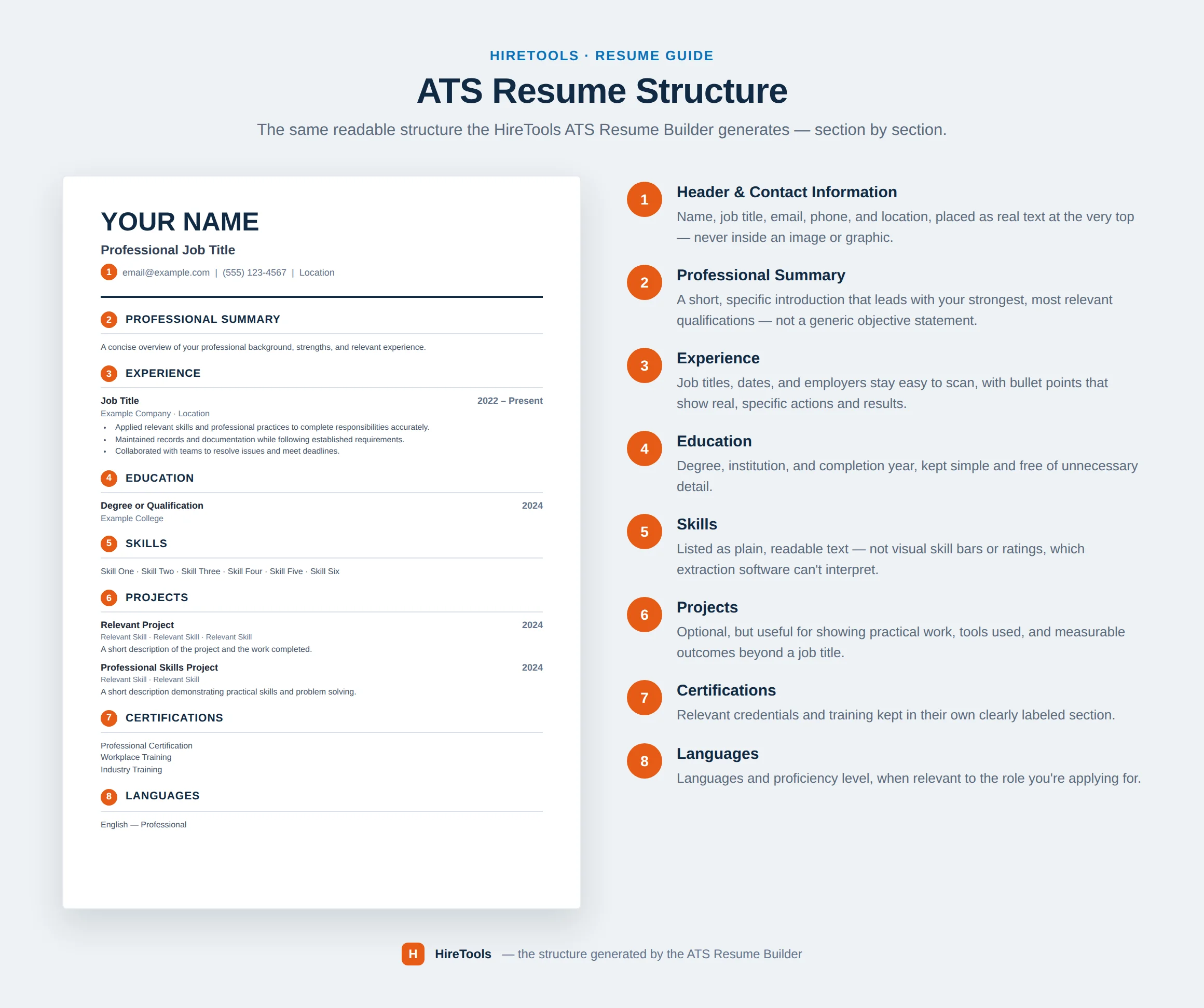
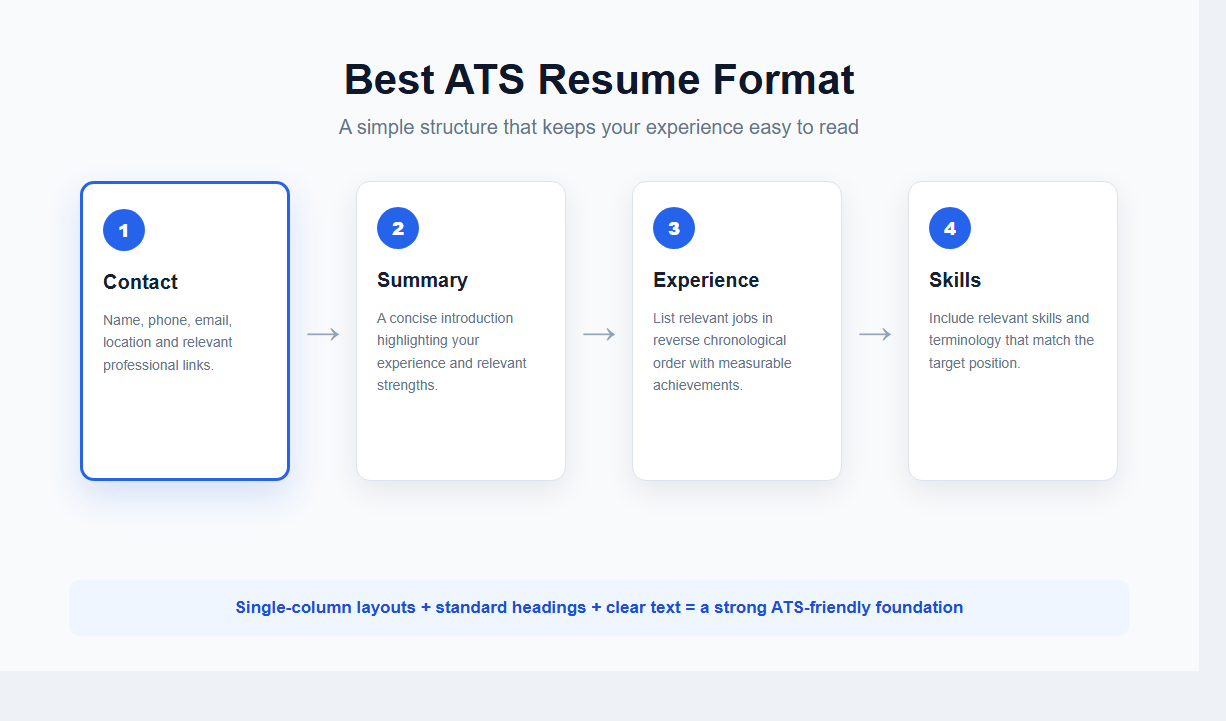
A typical ATS resume structure looks like this:
- Name and contact information
- Professional summary
- Work experience
- Skills
- Education
- Certifications
- Additional relevant sections
A chronological format is also commonly recommended because it presents employment history in a straightforward order. Indeed notes that chronological resumes are often compatible with ATS systems.
A functional resume, which focuses heavily on skills rather than employment history, can be useful in some circumstances, but it may make your career progression less obvious.
If you have relevant work experience, a reverse-chronological format is usually the safer starting point.
ATS-Friendly Resume Structure
A good ATS resume format should have a logical structure. Each section should be clearly labeled so that both the ATS and recruiter can understand where different information belongs.
1. Contact Information
Place your basic contact details near the top of the resume.
Include information such as:
- Full name
- Phone number
- Professional email address
- City and state/country
- LinkedIn profile, if relevant
- Portfolio or professional website, if relevant
Keep this section simple.
Avoid putting essential contact information inside complicated design elements or text boxes. You want the information to remain readable when the document is processed or converted between formats.
2. Professional Summary
Your professional summary should briefly explain who you are, what you do, and what you can offer the employer.
A strong summary can include:
- Your job title or professional identity
- Years of relevant experience
- Important skills
- Industry knowledge
- A significant achievement or area of expertise
For example:
Digital Marketing Manager with 7+ years of experience in SEO, paid advertising, content strategy, and marketing analytics. Managed multi-channel campaigns that increased organic traffic and qualified leads for B2B technology companies.
Keep the summary focused on the position you’re applying for rather than using the same generic paragraph for every application.
Harvard’s career guidance similarly recommends specific, clear, fact-based resume language and tailoring your resume to the position.
3. Work Experience
Your work experience section is one of the most important parts of an ATS resume.
Use a standard heading such as:
Work Experience
Then list your jobs in reverse chronological order.
For each position, include:
- Job title
- Company name
- Location, when appropriate
- Employment dates
- Relevant accomplishments and responsibilities
Use bullet points instead of long paragraphs.
Whenever possible, focus on achievements rather than simply listing duties.
Instead of:
Responsible for managing social media accounts.
Consider:
Managed social media campaigns across LinkedIn, Instagram, and Facebook, increasing engagement by 38% over 12 months.
Specific accomplishments give both recruiters and ATS systems more useful information about your experience.
4. Skills
Create a clearly labeled Skills section.
Include skills that are genuinely relevant to the position and that you can support through your experience.
For example:
Technical Skills:
Python, SQL, Excel, Tableau, Power BI
Marketing Skills:
SEO, Google Ads, Content Strategy, Email Marketing, Analytics
Don’t add every skill you have simply to increase the number of keywords.
Instead, review the job description and identify the skills that are genuinely relevant to the role.
You can learn more about identifying and using relevant terms in our guide to ATS resume keywords.
5. Education
Use a simple education section.
For example:
Bachelor of Science in Computer Science
University Name | City, State
2020
You can include additional details when they are relevant, such as:
- Degree
- Major
- University
- Graduation year
- Relevant certifications
- Academic honors
Experienced professionals generally do not need to give extensive space to older academic information if their professional experience is more relevant.
6. Certifications
If certifications are important for your profession, give them their own section.
For example:
Certifications
- Google Analytics Certification
- AWS Certified Solutions Architect
- Project Management Professional (PMP)
Use the full certification name where appropriate and include the acronym if it is commonly used in the industry.
This can also help your resume communicate relevant qualifications clearly.
ATS Resume Formatting Rules
The content of your resume matters, but formatting can affect how easily that content is read.
Here are some practical ATS resume formatting guidelines.
Use a Simple Layout
A clean, single-column layout is generally a safe choice.
Avoid turning your resume into a highly designed brochure. While creative layouts may look impressive visually, complex structures can make information harder for some systems to interpret.
Indeed specifically recommends avoiding complicated elements such as graphics, charts, and other formatting that can interfere with parsing.
A simple resume can still look professional.
Use:
- Clear headings
- Consistent spacing
- Bullet points
- Bold text for important labels
- Adequate white space
- Consistent alignment
Choose a Readable Font
Use a professional, easy-to-read font.
Common options include:
- Arial
- Calibri
- Times New Roman
- Georgia
A font size around 10–12 points is generally appropriate for the main body of a resume. Harvard’s resume guidance recommends common fonts and a 10–12 point range.
Your name can be larger than the body text, but don’t make the entire document oversized.
Keep Margins Consistent
Your resume should have enough white space around the edges to make it comfortable to read.
Avoid extremely narrow margins simply to squeeze additional information onto the page.
Harvard recommends equal margins and notes that margins should generally be at least half an inch.
Use Standard Section Headings
Use headings that are immediately understandable.
Good examples include:
- Professional Summary
- Work Experience
- Skills
- Education
- Certifications
- Projects
Avoid overly creative alternatives such as:
- My Journey
- What I Bring
- Where I’ve Worked
- My Toolbox
Creative headings might look interesting, but standard headings make the document easier to understand and scan.
Be Careful With Columns
Two-column resumes are popular because they allow you to fit more information into a smaller space.
However, columns can introduce unnecessary complexity when a resume is parsed by software. Some ATS platforms may interpret content in an unexpected order.
If ATS compatibility is your priority, a single-column layout is the safer option.
Avoid Tables and Text Boxes
Tables and text boxes can make a resume look organized, but they can also complicate how information is extracted.
Instead of placing your contact information, skills, or experience inside tables, use normal text and headings.
The same principle applies to important information hidden inside design elements.
Avoid Graphics and Images
Don’t rely on graphics to communicate important information.
For example, avoid:
- Skill bars
- Rating graphics
- Charts
- Logos
- Decorative icons
- Infographics
- Photos
A recruiter may understand a graphic immediately, but an ATS may not interpret it in the same way.
For a standard professional resume, text is usually the safer choice.
Harvard and Indeed both recommend keeping resumes clear and avoiding unnecessary graphics or complex formatting.
What File Format Should an ATS Resume Use?
The best file format depends on the employer’s instructions.
If the job application specifically asks for a PDF, submit a PDF.
If it asks for a Word document (.docx), submit a Word document.
If no format is specified, check the application system and follow its available options.
There isn’t a universal rule that one file format works for every ATS. Some systems handle PDFs well, while others may work more reliably with Word documents. Indeed notes that .docx can be a good choice for ATS compatibility, while also advising applicants to follow the employer’s requested format.
Before submitting your resume, open the final file and check that:
- Your text is selectable
- Your contact information is correct
- Headings appear correctly
- Bullet points are intact
- Dates are readable
- No content has moved
- The document looks the same after saving
Formatting that looks correct in your editor should also be checked in the final file you actually upload. Regardless of the file type, your ATS resume format should remain simple, readable, and easy to parse
Should an ATS Resume Be One Page?
Not necessarily.
The right resume length depends on your experience, career stage, industry, and the employer’s instructions.
A recent graduate may have enough relevant information for a one-page resume, while an experienced professional may reasonably need two pages.
The goal isn’t to make your resume as short as possible. The goal is to include the most relevant information without unnecessary repetition.
If you have several years of relevant experience, don’t remove valuable achievements simply to force everything onto one page.
At the same time, don’t add filler just to make the resume longer.
Common ATS Resume Formatting Mistakes
Even a strong resume can become less effective if its formatting creates unnecessary problems.
Here are some common mistakes to avoid:
1. Using a highly complicated design
Multiple columns, graphics, charts, and unusual layouts can make the resume harder to parse.
2. Hiding important information in headers or footers
Keep critical information in the main body of the document rather than relying on headers or footers.
3. Using unclear section headings
Stick with conventional headings such as Work Experience, Education, and Skills.
4. Using images instead of text
If an important qualification is represented only by an image or graphic, the ATS may not extract it correctly.
5. Stuffing keywords into the resume
Adding the same keyword repeatedly doesn’t make a resume better.
Use relevant keywords naturally and in context. Your resume should make sense to the recruiter reading it.
6. Using the same resume for every job
An ATS-friendly format is only one part of resume optimization.
Your resume should also reflect the requirements of the specific job you’re applying for.
7. Prioritizing design over readability
Your resume should look professional, but design should support your content rather than distract from it.
ATS Resume Format Example
A simple ATS-friendly resume can follow this structure:
YOUR NAME
City, State | Phone | Email | LinkedIn

PROFESSIONAL SUMMARY

Two to four sentences summarizing your experience, relevant skills, and strongest qualifications for the target role.

WORK EXPERIENCE

Job Title
Company Name | Location | 2023–Present

• Achievement or responsibility relevant to the target position.
• Achievement supported by a measurable result.
• Relevant skill or responsibility using natural job-specific terminology.

Previous Job Title
Previous Company | Location | 2020–2023

• Relevant achievement or responsibility.
• Relevant achievement or responsibility.
• Relevant skill, project, or result.

SKILLS

Skill | Skill | Skill | Skill | Skill

EDUCATION

Degree Name
University Name | Graduation Year

CERTIFICATIONS

Certification Name | Issuing Organization
This structure is intentionally simple. It gives your experience, skills, and qualifications a logical order without depending on complicated design elements.
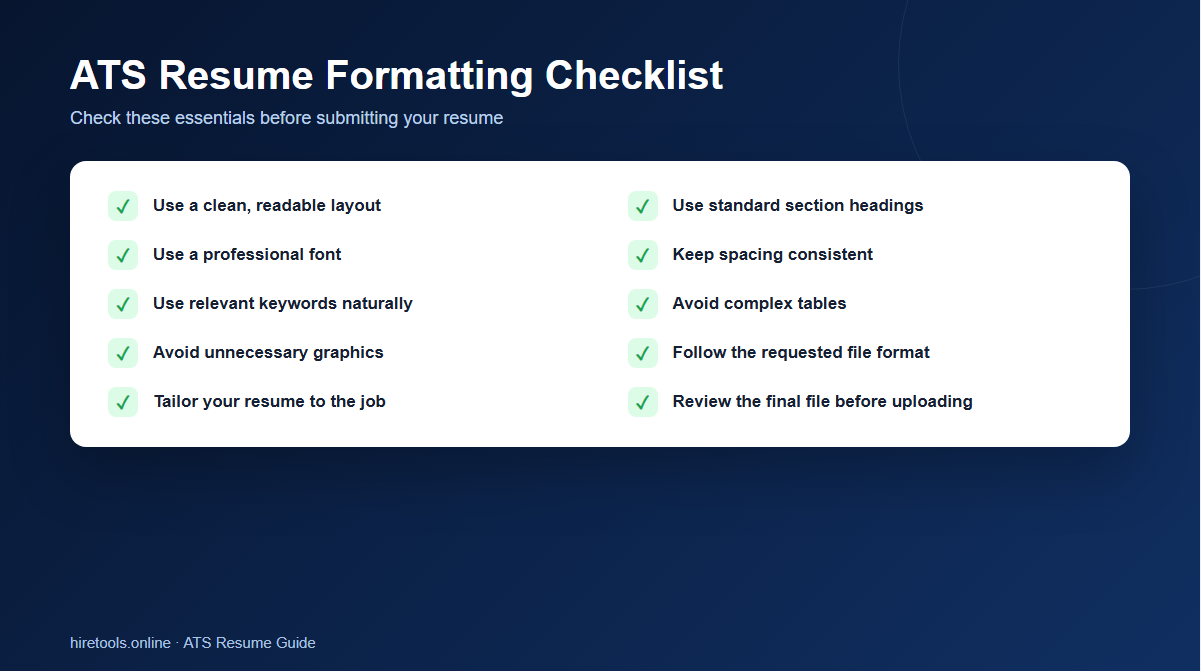
ATS Resume Format Checklist
Before submitting your resume, check the following:
- ☐ Your resume uses a simple, readable layout.
- ☐ Your work experience is easy to identify.
- ☐ Your jobs are listed in reverse chronological order.
- ☐ Your section headings are standard and clear.
- ☐ Your most relevant skills are included.
- ☐ Your resume uses relevant keywords naturally.
- ☐ You have avoided unnecessary graphics and images.
- ☐ You have avoided complicated tables and text boxes.
- ☐ Your font is professional and readable.
- ☐ Your spacing and alignment are consistent.
- ☐ Your contact information is easy to find.
- ☐ Your resume follows the employer’s requested file format.
- ☐ You have checked the final file before submitting it.
- ☐ Your resume has been tailored to the specific job.
Create an ATS-Friendly Resume
Creating an ATS-friendly resume doesn’t mean removing everything that makes your resume professional. It means putting your qualifications into a clear structure that both recruiting software and human readers can understand.
Start with a straightforward resume format, use standard section headings, focus on relevant experience and skills, and tailor your content to the job description.
If you want to build your resume without dealing with complicated formatting, you can use the HireTools ATS Resume Builder. It can help you create a structured resume while keeping ATS-friendly formatting in mind.
And if you’re still working on optimization, continue with our guide on ATS resume keywords to learn how to identify and use relevant terms from job descriptions.
Final Thoughts
The best ATS resume format is usually not the most complicated one. A clean structure, standard headings, readable typography, relevant keywords, and well-organized experience give your resume a better foundation for both ATS processing and human review.
Remember that ATS compatibility is only one part of a successful job application. Your resume still needs to demonstrate real skills, relevant experience, measurable achievements, and a clear connection to the position.
Think of the ATS as one part of the hiring process—not the person you’re trying to impress.
Build the resume for the system, but write it for the human who will ultimately decide whether you should move forward.