Modern applicant tracking systems generally accept both PDF and Word document formats. Job applicants should always follow specific employer or application instructions first. When no preference is specified, both text-based PDFs and standard Word files can be effectively parsed by recruiting software.
File extensions alone do not guarantee ATS readability. PDFs must feature selectable text rather than scanned images to ensure proper parsing. Similarly, Word documents must maintain simple layouts, avoiding complex design elements such as text boxes, tables, multiple columns, and graphics that can disrupt software text extraction.
ATS Resume PDF vs Word — Which File Format Should You Use?
You’ve finished your resume, checked your experience and skills, and you’re ready to apply for a job. Then the application asks you to upload your resume.
PDF or Word?
It sounds like a simple choice, but there is no universal rule that says PDF always works better with an applicant tracking system (ATS), or that Word is automatically safer. The best choice depends on the employer’s instructions, the application system, and how your resume is actually constructed.
Modern recruiting systems can process both PDF and DOCX resumes. For example, Greenhouse’s support documentation confirms it accepts .doc, .docx, .pdf, .rtf, and .txt candidate uploads, and Workday is widely documented — including by recruiters and integration partners — as accepting both DOCX and PDF resumes, with PDFs needing to contain real text rather than being scanned images in order to parse reliably.
So the real question is not simply “Is PDF or Word better?” It is:
“Which format gives this particular application system a clean, readable version of my resume?”
This guide explains how to make that decision, what a text-based PDF is, why scanned resumes can cause problems, and which formatting choices matter more than the file extension.
“If you’d rather skip the guesswork, our free ATS resume builder is already structured around the formatting rules covered in this guide.”
ATS Resume: PDF or Word? Quick Answer
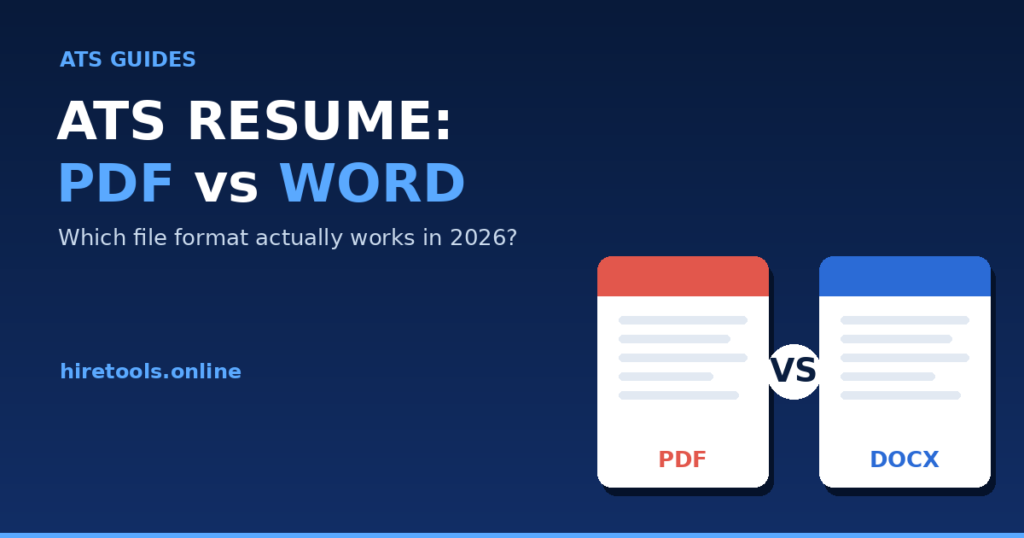
Short answer: Follow the employer or application system’s instructions first. If the system accepts PDF and your resume is a properly constructed, text-based PDF, PDF can be a practical choice because it preserves the visual layout. If the employer specifically requests DOCX, submit DOCX.
Neither file extension automatically makes a resume ATS-friendly. A badly structured DOCX can create parsing problems, just as a poorly generated or image-based PDF can.
| File type | ATS readability | Usually a good choice when | Main concern | Best practice |
|---|---|---|---|---|
| Can be highly readable when it contains real, selectable text | PDF is accepted and you want the layout preserved | Scanned or poorly constructed PDFs may not extract correctly | Test text selection and extraction before submitting | |
| DOCX | Widely supported by recruiting systems | The employer or application specifically requests Word | Complex formatting can still interfere with parsing | Keep the document structured and straightforward |
The important point is that file type and resume structure are separate issues. Changing a file from PDF to DOCX does not automatically fix poor formatting, missing information, unusual layouts, or text that cannot be extracted.
Can ATS Software Read PDF Resumes?
Yes, many modern recruiting systems can process PDF resumes. Greenhouse lists PDF among its supported candidate resume formats. Workday also supports PDF resumes, provided the file contains real text rather than being image-based.
That does not mean that every PDF will be interpreted perfectly by every system.
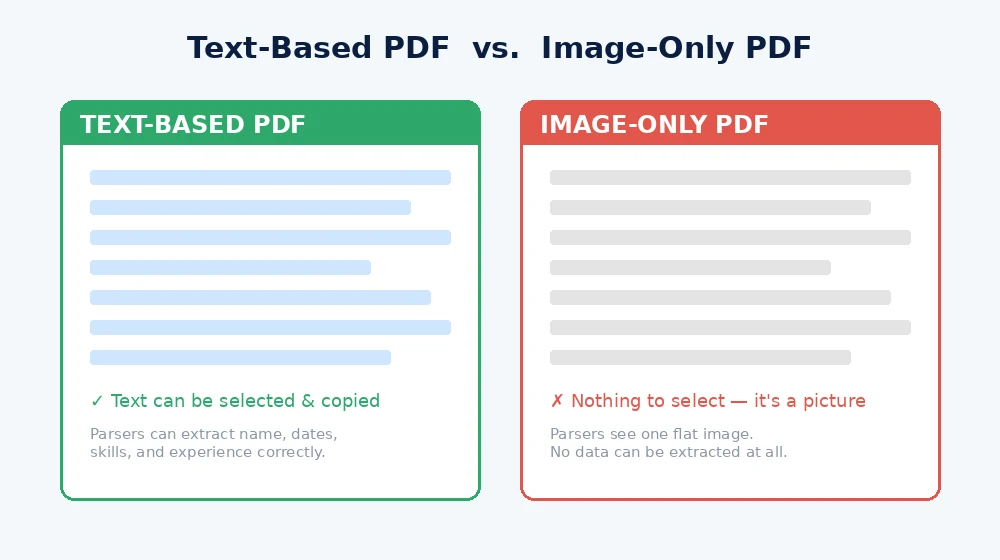
The important distinction is between a text-based PDF and an image-only PDF.
What is a text-based PDF?
A text-based PDF contains actual text information that software can select, copy, and extract. If you open the resume and can highlight words with your cursor, that is a useful sign that the document contains an accessible text layer.
Adobe explains that when text cannot be selected in a PDF, the content may be part of an image. Adobe’s OCR tools (Scan & OCR → Recognize Text) can recognize text in scanned documents and create a searchable text layer.
Why is an image-only PDF different?
Imagine taking a photograph of your printed resume and saving that photograph as a PDF. Visually, it may look exactly like a normal resume. But to software, the page may simply be one large image.
That creates a fundamental problem: the words that a person can see may not exist as extractable text in the document.
Adobe describes scanned PDFs as initially containing image data rather than searchable text. OCR can be used to create a searchable text layer, but the resulting recognition should still be checked for errors, since OCR is not always perfectly accurate.
Practical rule: Never assume that because a PDF looks readable to you, its text is necessarily readable to software.
Can ATS Software Read Word/DOCX Resumes?
Yes. DOCX is a widely used document format and is supported by major recruiting technology. Greenhouse lists both DOC and DOCX among its accepted candidate upload formats, and Workday is likewise documented as supporting DOCX for resume parsing.
DOCX documents contain structured document elements such as paragraphs and text runs rather than being simply a picture of a page. Microsoft’s Open XML documentation describes WordprocessingML documents as built from a body containing paragraphs, where each paragraph contains one or more “runs” of text — a structured format designed to be machine-readable.
However, DOCX does not automatically mean ATS-friendly.
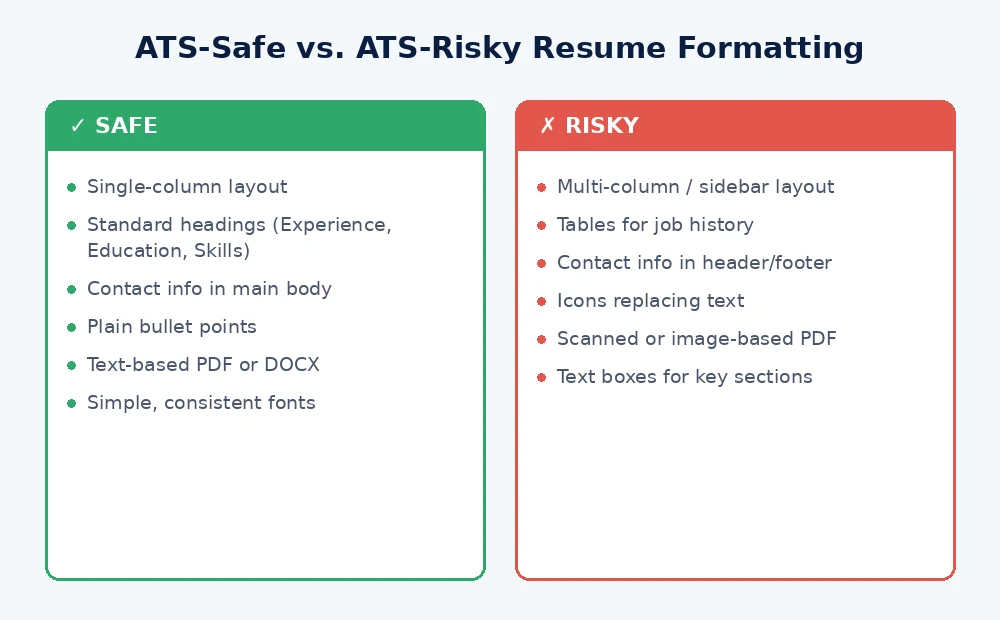
A Word resume can still use complicated layouts, text boxes, graphics, unusual structures, or other formatting that makes information harder for a parser to interpret. Greenhouse specifically documents parsing problems associated with graphics, photos, word art, tables, headers, footers, text boxes, column layouts, and unclear section structures.
So changing your resume from PDF to Word is not a magic fix. The underlying document still matters.
PDF vs Word: What Actually Matters for ATS Parsing?
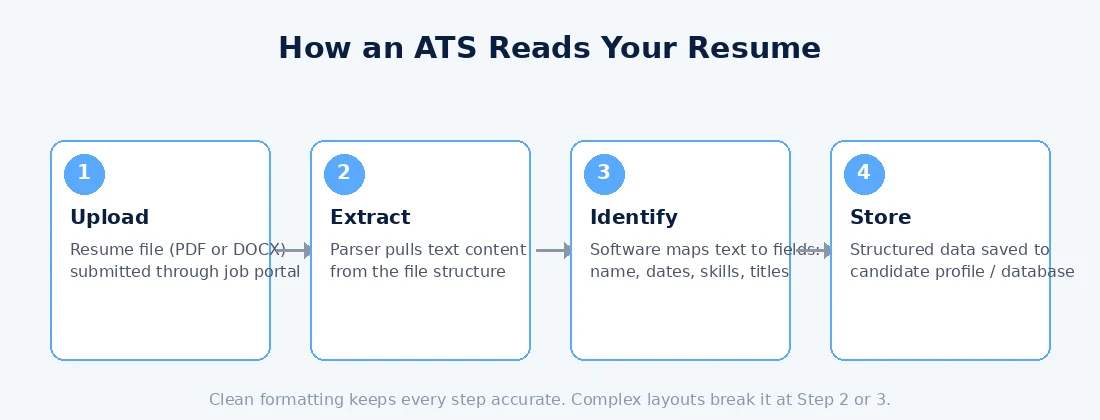
The file extension is only one part of the equation. A better way to think about ATS readability is to ask whether the information in your resume can be extracted and understood in a logical order.
1. Selectable text
Your name, contact information, job titles, dates, education, skills, and other important information should exist as actual text rather than being embedded solely inside an image.
2. Clear section headings
Use recognizable headings such as Professional Summary, Work Experience, Education, and Skills. Clear organization makes the document easier for both people and software to interpret.
3. Logical reading order
A resume may look perfectly organized visually while its underlying reading order is confusing. This can happen with complicated layouts where information is positioned independently around the page.
4. Simple formatting
Professional formatting does not require a highly decorated resume. A straightforward structure with readable text and consistent sections is generally easier to process than a page filled with decorative elements.
“Rather than manually checking each of these formatting rules, you can build your resume directly in a structured, ATS-friendly resume builder that avoids these issues by design.”
5. Tables
Tables can be useful for organizing information, but they can also introduce parsing complications depending on how the ATS processes the document. Greenhouse specifically lists complex resumes containing tables among formatting situations that can result in unsuccessful or partial parsing.
If information can be presented clearly without a complicated table structure, simpler formatting is usually the safer approach.
6. Multiple columns
Two-column resumes can look attractive, but they can create uncertainty about the order in which information should be extracted. Greenhouse identifies columned layouts as one formatting issue that can contribute to incorrect parsing.
7. Text boxes
Important resume information should not depend on floating text boxes or similar design elements. Greenhouse specifically notes cases where names and contact information placed in headers, footers, or text boxes were not interpreted correctly.
8. Icons and graphics
An icon may communicate a phone number or email address to a human reader, but software does not necessarily interpret visual symbols in the same way. Graphics and photos can also complicate parsing.
For important information, use actual text rather than relying on a graphic to communicate its meaning.
9. Headers and footers
Headers and footers can be useful for document design, but placing critical information there can create problems for some parsing systems. Greenhouse specifically lists headers and footers among formatting issues that can contribute to partial parsing.
10. Scanned documents
A scanned resume is fundamentally different from a normal text-based resume. If the document contains only page images, software may not have actual text to extract. OCR can create a text layer, but recognition errors are possible and should be reviewed.
When Should You Submit a PDF Resume?
PDF is often a practical choice when the application accepts PDF and there is no instruction requiring another format.
Consider using PDF when:
- The employer explicitly accepts PDF.
- The application system lists PDF as an accepted format.
- The job posting does not request DOCX and PDF is available as an upload option.
- Your PDF contains selectable, extractable text.
- You want the intended visual layout to remain consistent when the document is opened.
PDF is especially useful when you have carefully checked the exported document rather than assuming that every PDF is equally readable.
Major recruiting platforms demonstrate that PDF is not inherently incompatible with applicant tracking software. Greenhouse supports PDF uploads, and Workday’s own upload flows accept text-based PDFs as well.
When Should You Submit a Word/DOCX Resume?
Use DOCX when the employer or application specifically asks for Word.
This is the simplest rule in the entire PDF-versus-Word discussion:
If the employer tells you which format to use, follow the instruction.
DOCX is appropriate when:
- The job posting specifically requests a Word document.
- The application upload field requests DOCX.
- A recruiter asks you to provide an editable resume.
- The hiring workflow requires an editable document.
- The employer’s instructions do not accept PDF but do accept Word.
There is no advantage in sending a PDF simply because you have heard that PDFs are more professional if the employer specifically asked for DOCX.
What If the Job Posting Does Not Specify PDF or Word?
This is where a simple decision process helps.
- Check the job posting. Look for explicit file-format instructions.
- Check the application upload field. It may show which file types are accepted.
- Follow employer instructions. These take priority over generic online advice.
- If PDF is accepted and your PDF contains clean selectable text, PDF can be a practical choice.
- If DOCX is requested, submit DOCX.
- Do not convert files blindly. Changing the extension or format does not automatically repair an underlying layout problem.
For example, Greenhouse accepts both PDF and DOCX, so there is no reason to assume that one extension is universally required for every Greenhouse application.
The safest approach is therefore to combine the application’s instructions with a basic check of your resume’s actual text structure.
How to Check if Your PDF Resume Is ATS-Friendly
You can perform a simple test yourself before uploading your resume.
- Open the PDF.
- Try selecting a sentence. Drag your cursor across your summary or work experience.
- Copy the selected text.
- Paste it into a plain-text editor.
- Check the order. Make sure the pasted text follows a sensible sequence.
- Look for missing characters. Watch for strange symbols, missing words, broken letters, or unreadable characters.
- Check important sections. Confirm that your name, contact information, experience, education, and skills appear correctly.
- Look for information trapped in images. Important text should not exist only as part of a graphic.
If you cannot select the text in your PDF, that is a warning sign that the document may contain image-based content. Adobe specifically notes that text which cannot be selected may be part of an image, and explains how its Recognize Text (OCR) tool can create a selectable text layer.
This test is useful, but it is not a guarantee that every ATS will interpret your resume exactly as you expect. Different systems use different parsing technologies and configurations.
“Want to skip the manual copy-paste test? Every resume created with our ATS resume builder is exported as a clean, text-based PDF from the start.”
PDF vs Word: Common Myths
Myth 1: “PDF resumes automatically fail ATS software.”
Fact: That is too broad. Current recruiting platforms support PDF — Greenhouse and Workday both accept PDF resumes when the file contains real text rather than image-only content.
Myth 2: “Word is always safer.”
Fact: DOCX is widely supported, but formatting inside the document can still cause parsing problems. The file extension does not remove the need for a clean structure.
Myth 3: “PDF is always safer.”
Fact: PDF can be a good choice when it is text-based and accepted by the application, but an image-only or poorly structured PDF can create problems.
Myth 4: “If I can see the resume correctly, an ATS can read it correctly.”
Fact: Humans and parsing software do not necessarily interpret documents in the same way. A visually attractive layout can still contain information in structures that a parser handles poorly. Greenhouse documents issues involving graphics, tables, columns, text boxes, headers, and footers.
Myth 5: “Changing the file extension fixes ATS problems.”
Fact: Converting PDF to DOCX or DOCX to PDF does not automatically repair complex formatting, missing text, unusual structures, or other parsing issues.
Myth 6: “An ATS-friendly file guarantees that I will pass screening.”
Fact: No file format can guarantee a particular hiring outcome. Resume parsing is only one part of an application process, and employers use different systems and screening workflows.
What File Format Does HireTools Use?
HireTools provides a PDF download from its ATS Resume Builder.
But the goal is not simply to produce a file with a .pdf extension. The resume builder is designed with ATS readability in mind, using a structured resume format intended to keep resume content readable and extractable by software.
That means the important considerations remain the same ones discussed throughout this guide:
- Clear resume sections
- Readable text
- Logical information structure
- Professional formatting
- Relevant job keywords
- Targeted resume content
HireTools does not claim that its PDF will work identically with every ATS. Instead, the builder is intended to help users create a structured resume whose content is readable and extractable by software.
“Build a free ATS-friendly resume in minutes — no login, no signup, no credit card. Try the ATS Resume Builder →“
How HireTools Helps You Build an ATS-Friendly Resume
HireTools takes a structured approach to creating the resume instead of asking you to design every part of the document from scratch.
- Choose your resume template.
- Choose your target job.
- Add personal information.
- Create your professional summary.
- Add work experience.
- Add education.
- Add skills.
- Add optional projects, certifications, and languages.
- Review the live resume preview.
- Download the completed resume as a PDF.
The target-job feature can also provide relevant suggestions for your professional summary, skills, ATS keywords, certifications, and experience bullets.
These suggestions are intended as guidance. They are not facts about you.
Only include skills, certifications, experience, qualifications, and other information that is truthful and genuinely applies to you. Adding a keyword simply because a tool suggested it does not make the qualification true.
The builder also provides a live preview so you can review the finished resume before downloading it.
PDF vs Word: Final Decision Checklist
Use this quick checklist whenever you are unsure which file to upload.
If the employer specifically requests PDF
- Submit PDF.
- Make sure the PDF contains selectable text.
- Keep the formatting straightforward.
- Check the extracted text before submitting.
If the employer specifically requests DOCX
- Submit DOCX.
- Keep the same ATS-friendly structure.
- Check that headings, bullets, dates, and sections remain readable.
- Do not assume that DOCX automatically solves formatting problems.
If both PDF and DOCX are accepted
- Compare how your resume looks and extracts in each format.
- Prefer the format that preserves your content cleanly.
- If your PDF is text-based and the application accepts it, PDF can be a practical option.
- If the employer gives a preference, follow it.
If no format is specified
Check the application system first. If PDF is accepted and your resume contains clean, selectable text, it is a reasonable choice. If the application provides no clear information, avoid relying on generic claims that one format is universally ATS-safe.
Frequently Asked Questions
Is PDF or Word better for an ATS resume?
Neither is universally better. Use the format requested by the employer or application. If PDF is accepted and your resume contains clean, selectable text, PDF can be a practical choice. DOCX is also widely supported and may be preferable when specifically requested.
Can ATS systems read PDF resumes?
Yes, many current ATS and recruiting systems support PDF resumes. Greenhouse and Workday both support PDF. However, the PDF should contain actual text rather than only scanned images.
Can ATS systems read DOCX resumes?
Yes. DOCX is widely supported by recruiting systems, including Greenhouse and Workday. However, DOCX formatting can still affect how information is parsed.
Should I submit my resume as PDF?
If the application accepts PDF and does not request another format, a properly constructed text-based PDF can be a good choice. Always check the employer’s instructions first.
When should I use DOCX instead of PDF?
Use DOCX when the employer or application specifically requests Word, when a recruiter asks for an editable document, or when the hiring workflow requires an editable resume.
Is a scanned PDF ATS-friendly?
A scanned PDF can be problematic if it contains only page images and no searchable text layer. OCR can convert image text into selectable text, but the result should be reviewed for recognition errors.
Can ATS software read text inside images?
You should not rely on important resume information being stored inside images. Parsing systems are designed to extract document information, and image-based content may not be interpreted in the same way as actual document text.
Does PDF guarantee ATS compatibility?
No. PDF is simply a file format. Compatibility depends on the application system, the PDF’s construction, its text layer, layout, and other factors.
Does Word guarantee ATS compatibility?
No. DOCX is widely supported, but a Word document can still contain formatting that causes parsing problems.
What format does HireTools provide?
HireTools ATS Resume Builder provides a PDF download. The builder is designed with ATS readability in mind and uses a structured resume format intended to keep content readable and extractable by software.
Final Verdict: ATS Resume PDF or Word
The best answer to “PDF or Word for an ATS resume?” is not simply PDF or DOCX.
Follow the employer’s instructions first.
If DOCX is requested, use DOCX. If PDF is requested, use PDF. If both are accepted, choose the format that produces the cleanest, most readable version of your resume and verify that your text can be extracted properly.
A text-based PDF can be read by modern recruiting systems, and DOCX is also widely supported. The real risk is often not the extension itself but the way the resume is constructed: image-only content, complicated layouts, unclear reading order, excessive graphics, text boxes, complex tables, columns, or important information hidden in headers and footers can create parsing difficulties in some systems.
In other words, changing from PDF to Word does not automatically make a resume more ATS-friendly.
If you want to create a structured resume without paying for a subscription or creating an account, you can build your ATS-friendly resume with HireTools and download it as a PDF.
Sources & Further Reading
- Greenhouse Support — Supported formats for resumes, cover letters and other candidate uploads
- Greenhouse Support — Unsuccessful resume parse (common causes)
- Adobe Acrobat — Scan documents to PDF and recognize text (OCR)
- Microsoft Learn — Structure of a WordprocessingML document
“You’ve read the theory — now put it into practice. Create your ATS-optimized resume for free and download it as a clean, parser-friendly PDF in minutes.”